Getting started
Quickstart
Render haemoglobin and show its heme pocket in Python.
This workflow intentionally starts with biology: a haemoglobin cartoon gives global context; the heme and its local protein pocket get atomic detail.
Load 4HHB with MolFrame
import urllib.request

import molframe
import molgfx

cif = urllib.request.urlopen("https://files.rcsb.org/download/4HHB.cif").read()
# Infer bonds so atom-and-bond representations have sticks to draw.
structure = molframe.read(cif, name="4hhb.cif").infer_bonds()
Build a scene
scene = molgfx.Scene(structure)
scene.add(molgfx.rep.cartoon(target=molgfx.sel.protein(), color=molgfx.color.chain()))
scene.add(molgfx.rep.spacefill(target="resname HEM"))
scene.add(molgfx.rep.ball_and_stick(
    target="byres (within 5 of resname HEM) and protein",
    radius=0.25,
    color=(255, 165, 0),
))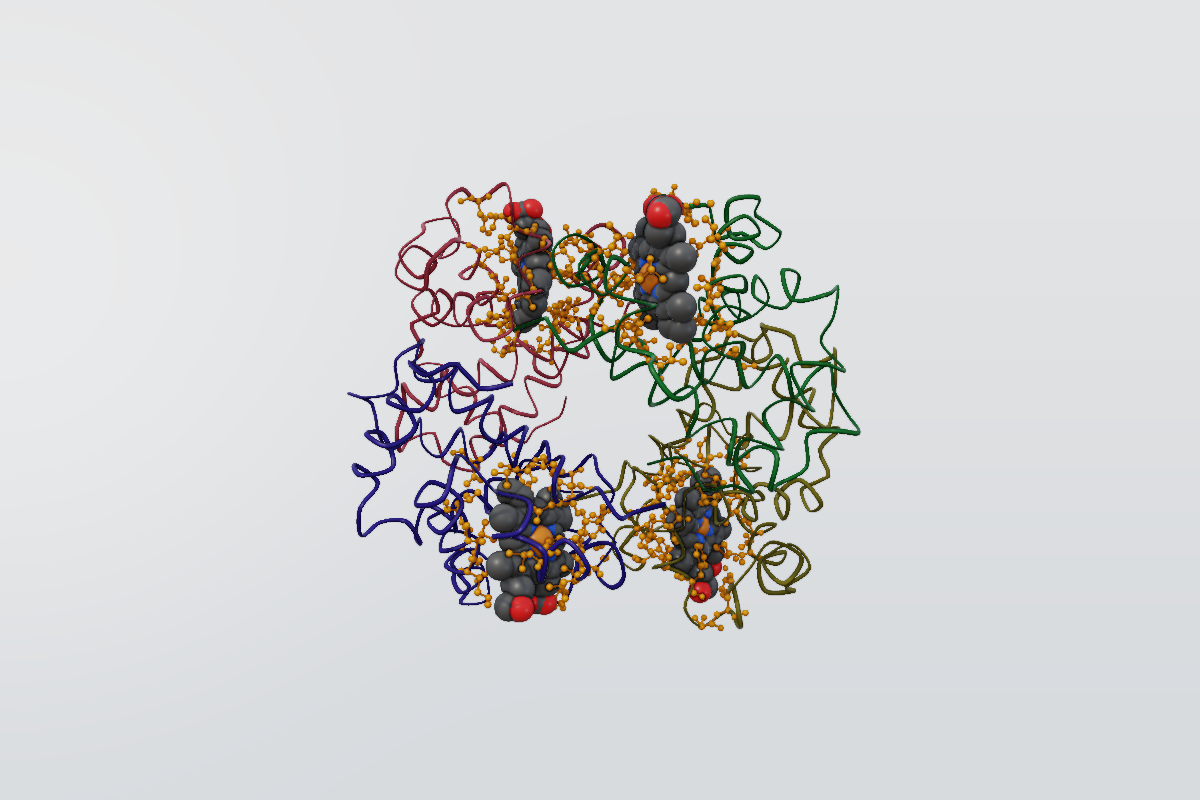
The render shown here is produced by the same MolGFX scene described above.
Render an image
renderer = molgfx.Renderer(profile=molgfx.profile.converged())
renderer.render_image(scene, size=(1600, 1000)).save("4hhb-pocket.png")
render_image frames the scene for the requested size. In a notebook, display molgfx.Viewer(scene) to preserve this authored scene. In a browser, use the official Viewer from molgfx and supply structure bytes; it owns the canvas lifecycle over the same Rust engine. MolGFX does not launch an application window.